
[ad name=”postsqrRight”]FireSheep has kicked up one hell of a storm since it was announced, and has made what was once reserved for the hard core geeks easily accessible to everyone, now anyone with 5 minutes can access the social networks and website accounts of the majority of people on the local network or wifi, particularly dangerous when you surf in you’re favourite hot spot.
So now I will tell you how you can install and use this clever (and scary) little add-on for FireFox and “test your security”.
1. Check you have the correct version of FireFox.
To install this plugin you must be running FireFox version 3.6.12 or newer, if you are not already running the latest version you will need to update FireFox before continuing.
2. Install Winpcap (Windows Only)
Because windows doesn’t include raw sockets which enable this add-on to sniff the network you will need to install winpcap first.
You can download winpcap here, follow the installer as normal.
3. Download FireSheep XPI
To download the XPI FireSheep Add-on head over to GitHub and save it to your desktop.

[ad name=”posts”]
4. Install FireSheep in FireFox
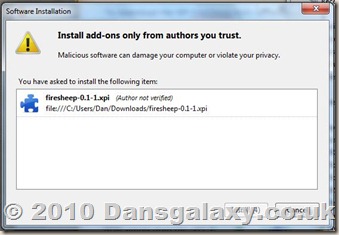
Open FireFox, and click Tools –> Add-ons.
Now simply drag the .XPI FireSheep file you downloaded previously into the Add-ons dialog box.
This should then proceed to the install dialog (as shown on the right)
Once the Install button has activated click to install when the installation has completed you will be prompted to restart FireFox – Do it.
5. Using FireSheep
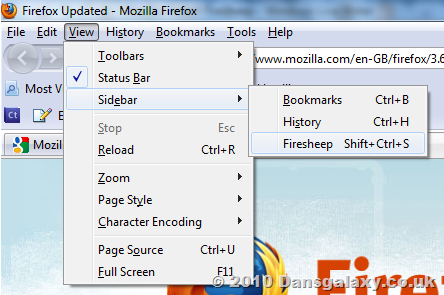
To use FireSheep click View –> Sidebar and select FireSheep to display the FireSheep sidebar.
To start capturing session cookies click the “Start capturing” button and you are away and FireSheep will now begin sniffing for sessions on the network or Open Wifi point.
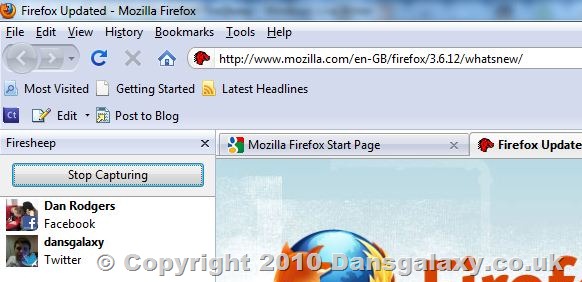
You can now simply double-click on the users/websites which appear the the sidebar and the stolen session cookies will let you login as that person.
Obligatory legal note: While it is NOT illegal to download, install and use this add-on it IS illegal to use it to gain unauthorised access to other people’s accounts and/or information. If you do it, on your head be it.
Share the love. Retweet & Digg this!
i have installed firesheep but nothing happens if i push the start capturing button
This is likely because there simply isn’t anybody else on the network which it can “sniff”, try logging into Facebook (not using SSL) on the pc it’s running on, if it’s working you should see your Facebook account show up in firesheep.
ok so lets say i install the programm at home that would mean i can sniff my sisters laptop and my dads but not anyone who lives probably 20 miles away?
but if i install it at school i can sniff through anyone who is online in school?
It can sniff network traffic on the local network, so if your local hub has your sister on, and the connection is insecure, then yes in theory you can sniff that traffic.
But most schools etc will have a decent quality system and connections should be isolated for security, so you can’t intercept the packets.
oh ok thx!
is there any other way to log in into another account? i think my gf is cheating on me 🙁
updated version for FireFox v5 ?
Do you have a version that works with Firefox 5?
Hi Dan, I’m using FireFox ver 3.6 on Mac Lion and the installation process went fine. When I start capture nothing happens. I used Winshark and can successfully capture all the data. Any ideas..
In the Preference section for FreeSheep I selected Facebook and then it asked me name it. Is this correct. Do you have select the appropriate Apps to capture?
Thanks
Wakyl
i cant install this. when i do click on firesheep an error shown
backend exited with error 1 this error is shown when i start capturing pls give solution